I just moved offices and had to re-verify my Google Business Profile. During the process, I realized that about half the GBP advice floating around online is outdated — some of it dangerously so. The Q&A feature most guides tell you to “seed with your own questions”? Google retired it. The postcard verification everyone describes? Mostly replaced by video. The algorithm that decides whether you show up in the Map Pack? Different priorities now.
So I rewrote this page. What you are reading is the current reality as of March 2026, stripped of recycled blog advice and inflated statistics. If you have not claimed your Google Business Profile yet, or if yours is sitting there half-finished, this is the walkthrough I wish someone had given me.
Half the GBP advice online is outdated. The Q&A feature? Retired. Postcard verification? Mostly replaced. The algorithm? Different priorities. This is the 2026 version.
Why GBP Before Anything Else
Before you pay for ads, before you upgrade your Psychology Today listing, before you hire an SEO company — this is where you start. Your Google Business Profile is completely free, you own it, and for many solo practices, it delivers more visibility than what you are paying for elsewhere.
When someone searches “therapist near me,” the first thing they see is not a website. It is the Map Pack The box of 3 local business listings that appears at the top of Google search results with a map. For local searches, this appears before organic results and often before paid ads. — those three local business listings at the top of search results with a map. Your GBP is what determines whether you are one of those three.
Here is what that looks like in actual money:
| Channel | Monthly Cost | What You Get |
|---|---|---|
| Google Business Profile | $0 | Map Pack placement, reviews, posts, booking, messaging |
| Psychology Today | $30 | A listing alongside thousands of others |
| SEO services | $500-1,500+ | Organic ranking improvements (takes 6+ months) |
| Google Ads | $300-1,000+ | Paid clicks — stops the moment you stop paying |
| Facebook/Instagram Ads | $200-800+ | Social impressions — low conversion for therapy |
Here is what I see constantly: a therapist paying $30 a month for Psychology Today, maybe another $300-500 on Google Ads to “get some visibility,” and their Google Business Profile either does not exist or says nothing beyond their name and phone number. They are paying for marketing while ignoring the free thing that outperforms both.
How to Claim Your Profile (The 2026 Process)
If you have not claimed your profile yet, here is what the process actually looks like right now — not what it looked like two years ago.
Here is what each step looks like when you actually sit down and do it:
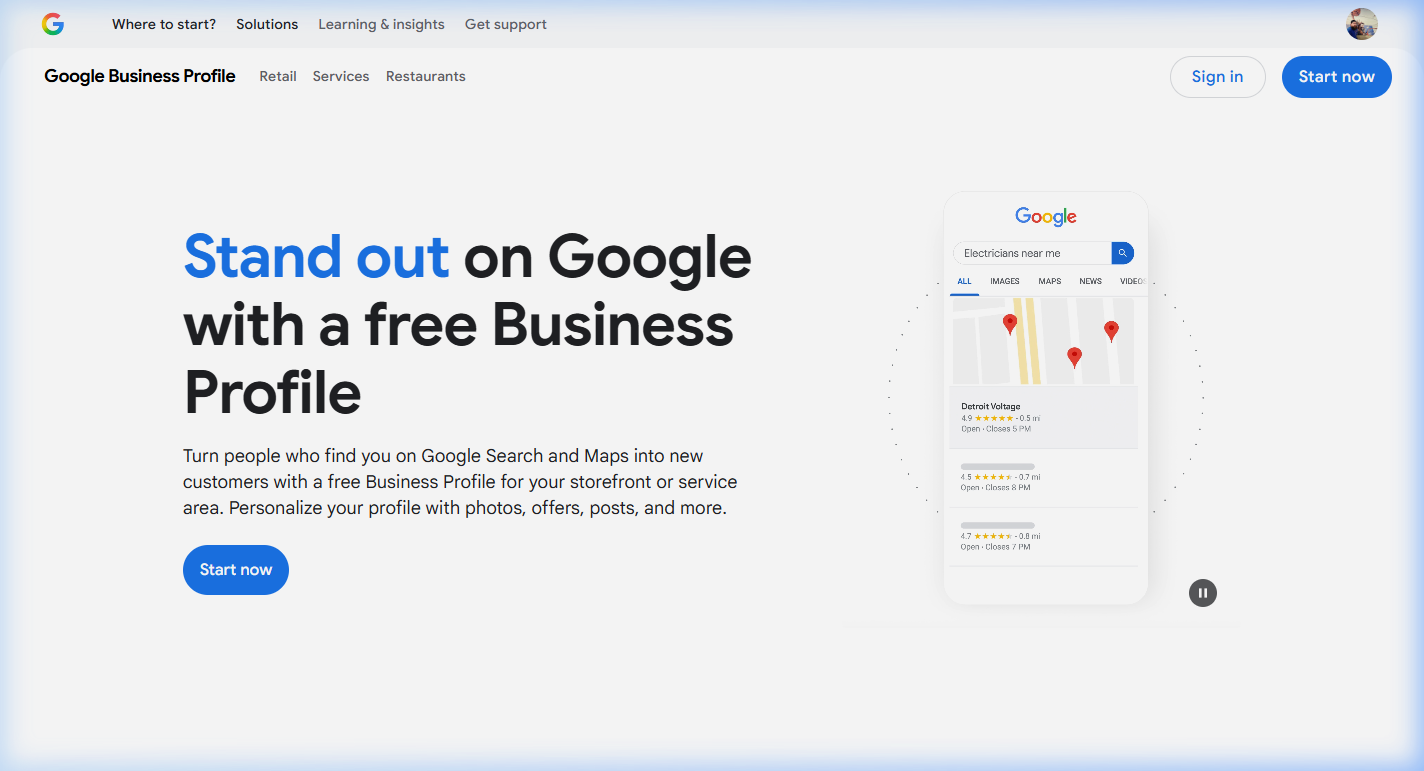
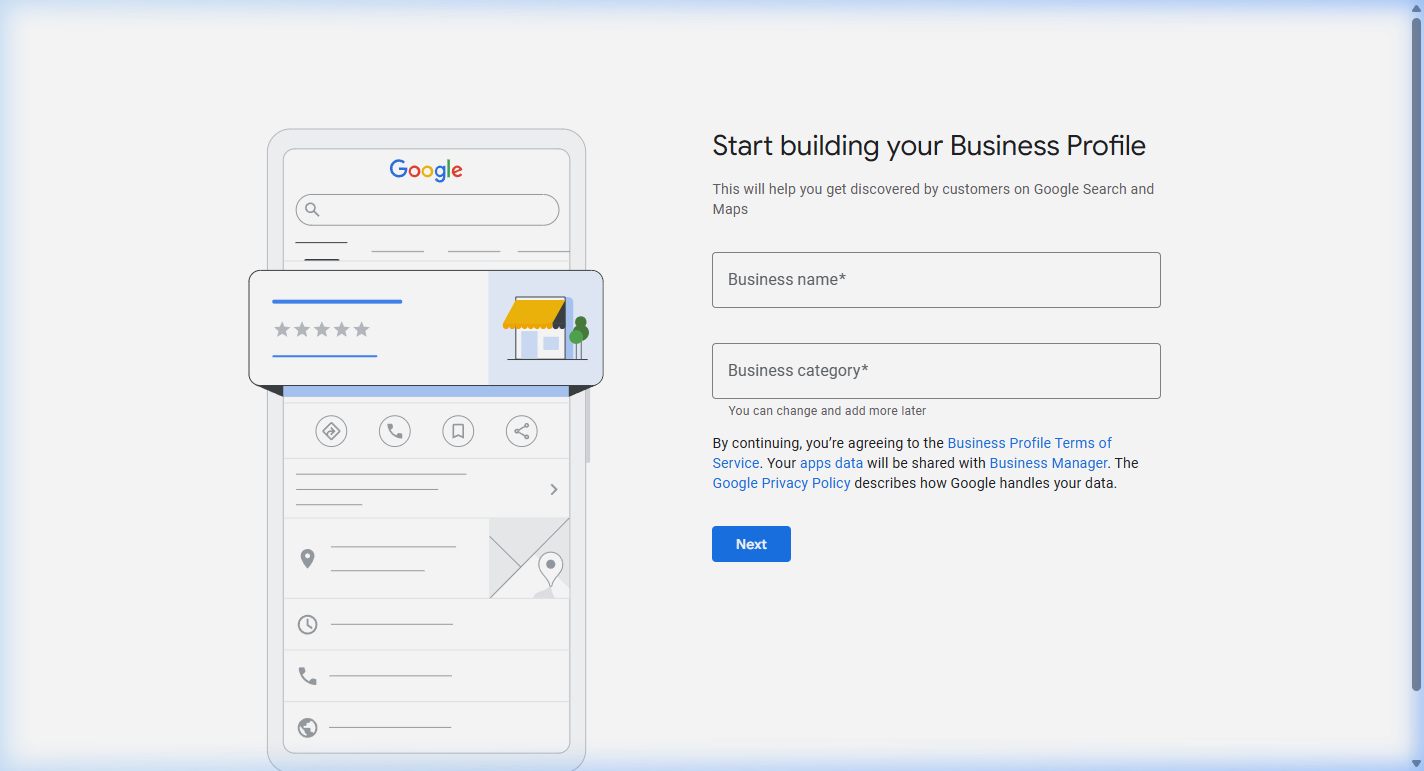
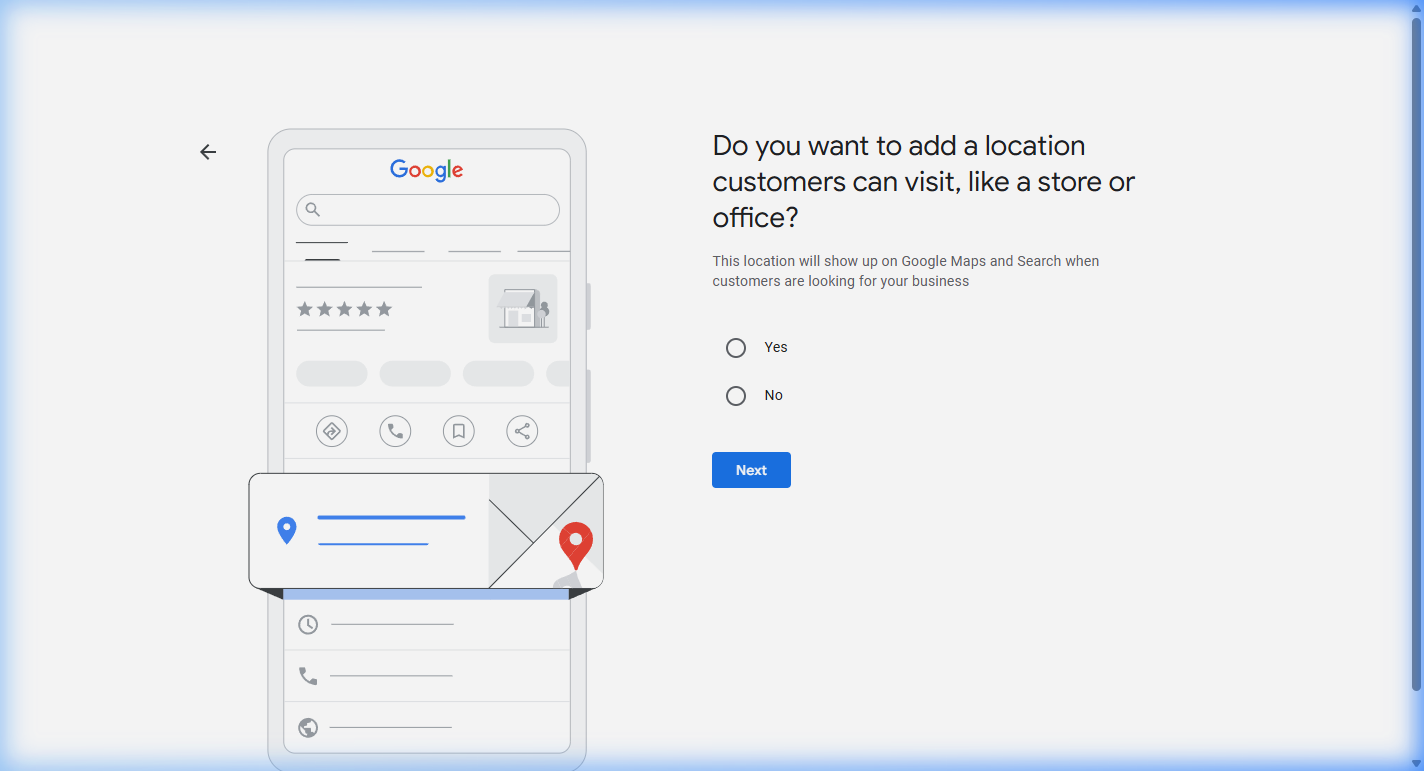
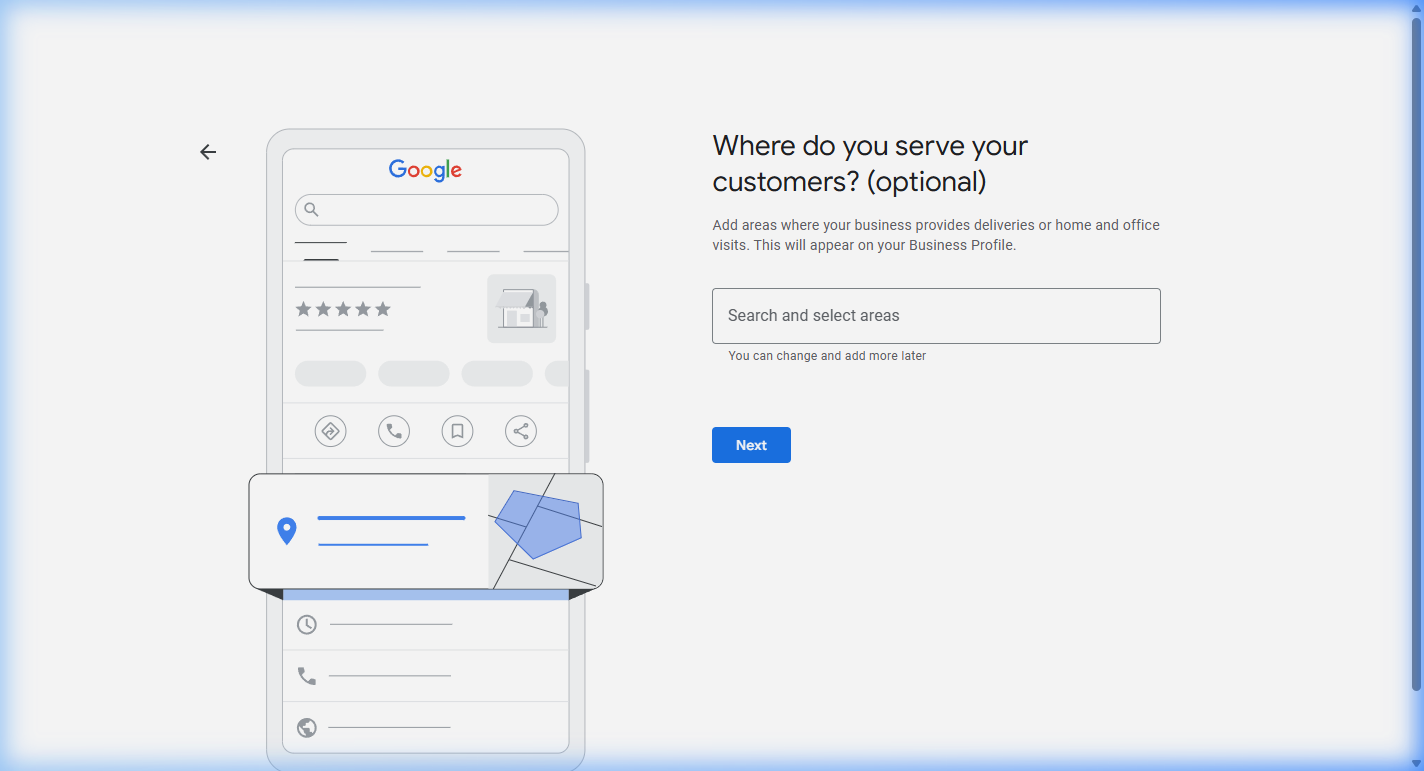
The Stuff That Changed (And the Advice You Should Stop Following)
Verification Is Different Now
Two years ago, Google sent you a postcard with a code. You waited 5-14 days, typed in the code, and you were done. That method still technically exists, but it is being phased out.
In 2026, the primary verification method is video verification. Google asks you to record a continuous, unedited video showing:
- Exterior: Your building, street name or address numbers, any signage
- Interior: Your office space, evidence this is a real business
- Proof of management: Unlocking the door, business license, or branded materials
The video should be 30 seconds to 5 minutes. Do not pre-record it — use the interface Google provides. And do not panic. It does not have to be cinematic. It just has to be real.
I went through re-verification when I moved offices. The process was mildly annoying — like filling out forms at a new doctor’s office. It was not the nightmare the internet makes it sound like. You can do this.
The Q&A Section Is Gone
This is the big one. If you have read any GBP optimization guide written before 2026, it probably tells you to “seed your Q&A section” — ask and answer your own common questions on your profile.
Google discontinued the Q&A API in November 2025 and started phasing out the public Q&A section in December 2025. It is being replaced by something called “Ask Maps” — where Google’s AI ( Gemini Google’s AI assistant that now powers features across Google Search, Maps, and Business Profiles. It generates answers by scanning your profile, website, and reviews. ) generates answers to user questions by scanning your profile, your website, your reviews, and other public information.
What this means for you: you can no longer control the Q&A on your profile directly. Instead, the answers Google’s AI gives about your practice are pulled from the information you put everywhere else. Your profile description, your website’s FAQ page, your reviews — that is what feeds the AI.
The advice is not “seed your Q&A” anymore. The advice is: make sure the information on your profile and website is complete, accurate, and answers the questions your potential clients are asking. The AI will find it.
The Algorithm Shifted
Google’s local search algorithm has always considered three things: proximity How close your practice is to the person searching. You cannot change this, but optimizing everything else extends your effective radius. (how close you are to the searcher), relevance (how well your profile matches their search), and prominence (how well-known your business is).
What changed in 2025-2026 is what counts as “prominence.” It used to be mostly about links and citations. Now it is increasingly about behavioral signals — how many people interact with your profile. Photo views, review reads, website clicks, direction requests, calls. Google is watching whether real humans engage with your listing.
The practical takeaway: a complete, actively maintained profile with recent photos and regular posts now directly affects your ranking. The days of “set it and forget it” are over.
What to Actually Optimize (And the Order That Matters)
Once you are verified, here is what to focus on — in order of impact:
1. Business Description (750 Characters)
You get 750 characters. The first 250 matter most — that is what shows in search results before the “Read more” click. Lead with what you do and who you help. Not your credentials. Not your philosophy.
2. Photos and Videos
Upload real photos. Your office. Your waiting room. A professional headshot where you look like a real person, not a stock photo. Google’s own help documentation recommends adding photos, and profiles with photos and videos consistently appear richer and more complete to searchers.
New in 2026: short videos (up to 90 seconds) are now displayed prominently on profiles. A quick “welcome to my practice” video builds trust before someone ever calls you. Aim to add 1-2 new photos per month minimum — active photo updates are now a ranking signal.
3. Reviews
Reviews matter enormously — both for Google’s algorithm and for the human being deciding whether to call you. A few things to know:
Asking for reviews is ethical. You cannot ask current clients during treatment — but you can ask former clients, colleagues, supervisors, or anyone who has interacted with your practice professionally. Many state licensing boards have specific guidance on this. For a deeper dive on review ethics and strategy, see our complete guide to reviews for therapists.
Respond to every review. Most therapists do not do this. A thoughtful response (that protects confidentiality — never confirm someone is a client) shows potential clients that you are engaged and responsive.
Recency matters. Five reviews from 2023 are less valuable than two reviews from this month. Google weighs recent reviews more heavily.
4. Posts
Google Posts are free mini-updates that appear on your profile. Think of them as social media posts, except they are on Google where people are actually looking for a therapist. Post about new availability, mental health awareness topics relevant to your specialty, or practice updates.
Aim for 1-2 posts per week. In 2026, activity is a top-tier ranking factor.
5. Services and Products Sections
Even though you are not selling “products,” GBP’s Products section works well for listing your therapy modalities. Create entries for each service: Individual Therapy, Couples Counseling, EMDR, Telehealth Sessions. Each listing gives Google additional context and makes your profile look more complete compared to profiles that only have a name and phone number.
6. Booking Links
If you use SimplePractice, Jane App, Calendly, or any online scheduling tool — add the direct booking link to your GBP. This creates a “Book Online” button right on your profile. The shorter the path from “this therapist looks good” to “I just scheduled,” the better.
If You Work from Home or Do Telehealth Only
This is where most guides fall apart, because they are written for businesses with storefronts. Therapists who work from home or exclusively do telehealth have specific challenges:
Home Office — Do Not Show Your Address
If clients do not come to your home, register as a Service-Area Business A GBP designation for businesses that travel to customers or serve a geographic area without customers visiting the business location. Your address is hidden from public view. (SAB). During setup, select the option that says “customers do not visit my business for services.” This hides your home address from your public profile while still allowing you to appear in searches for your area.
Video Verification Without Signage
If Google asks for video verification and you do not have a commercial space with signage, here is what works:
Do not show faces. Do not narrate. Just show the space and the evidence.
Telehealth-Only Practices
You can absolutely have a Google Business Profile without a physical location clients visit. Use the Service-Area Business designation. Set your service area to the geographic regions where you are licensed. Focus your description on your virtual therapy expertise. Invest extra in professional headshots and a “welcome” video, since potential clients cannot see a physical office.
How to Know If It Is Working
Google provides free performance data in your GBP dashboard under “Performance.” Here is what to actually look at:
Search queries: The exact terms people used to find you. If “anxiety therapist [your city]” shows up and “couples counselor [your city]” does not, that tells you what your profile is optimized for — and where there is room to improve.
Customer actions: Website clicks, direction requests, phone calls. This is your conversion metric. If you are getting views but no actions, your profile is not compelling enough — look at your photos, description, and reviews.
Discovery vs. direct searches: “Discovery” means someone searched a category (“therapist near me”) and found you. “Direct” means they searched your name. You want mostly discovery — that means you are reaching new people, not just existing contacts.
Check these monthly. Adjust your description, categories, and post frequency based on what the data tells you.
When GBP Is Not Enough (And What Comes Next)
GBP is your foundation, not your ceiling. Here is when to invest in the next layer — and the order still matters:
After GBP → Build or improve your website. A professional, mobile-optimized website is your next highest-impact investment. Your GBP links to your website — if the website does not convert visitors to callers, your GBP does the hard work for nothing. You do not need an expensive custom site. A clean, well-built website that clearly describes your services and makes it easy to contact you is more than sufficient for most solo practices.
After your website → Start creating content. Blog posts targeting questions your clients actually ask build organic visibility over time. This is free (just your time) and it compounds — a good blog post keeps generating traffic for years, unlike ads that stop the moment you stop paying.
After content → Consider paid marketing, if you need faster growth. Google Ads targeting high-intent searches (“therapist near me” + your city) can supplement your organic visibility. But only invest here after your GBP and website are actually converting visitors. Start modest: $300-500/month.
The order matters. Skipping steps wastes money. A beautifully optimized GBP that links to a website last updated in 2019 is a leaky bucket.
Your Google Business Profile is one of the highest-ROI marketing assets available to you right now. It costs nothing to claim, nothing to optimize, and it puts you in front of the exact people searching for what you offer.
If you have not started yet — start today. Go to business.google.com. Search your practice name. The basic information takes about 30-60 minutes to enter. Writing a strong description and gathering photos might add another hour. Verification usually completes within a week.
And if you want someone to walk through it with you — from categories to description to your first posts — that is exactly what the Collaboration Fit Check is for. Twenty minutes, free, no commitment. Just a conversation about where you are and what makes sense next.